
Schedule intelligence for project controls
Schedule intelligence. Deterministic where it matters.
SchX calculates your schedule with its own engine, answers questions about it in plain English and drafts the next section for you. Nothing goes in until you approve it.
Everyone is racing to put AI into everything. Have we stopped to ask what it should actually deliver?
AI should automate the work, not invent the answer. In planning, the answer has to be deterministic: one result, every time, that you can defend.
Ask the basics.
- Engine. What calculates the schedule: its own CPM engine, or AI writing code to imitate one?
- Parity. Run a real schedule here and in P6. Do the dates, float and critical path match?
- Determinism. Run it twice. Same answer?
- Real logic. Does it handle calendars, constraints, lags and out-of-sequence progress correctly?
- Scale. Does it hold up at 20,000 activities, not a 200-activity sample?
- Change control. When AI suggests a change, does a planner approve it before it lands, with an audit trail?
- Traceability. Can every answer be traced back to the activities it came from?
- Data. Where does the schedule go, and which model sees it?
- Value. What gets faster, by how much, measured on a real schedule?
- Simplicity. Does it work out of the box, with no virtual machines, add-ons or export round trips?
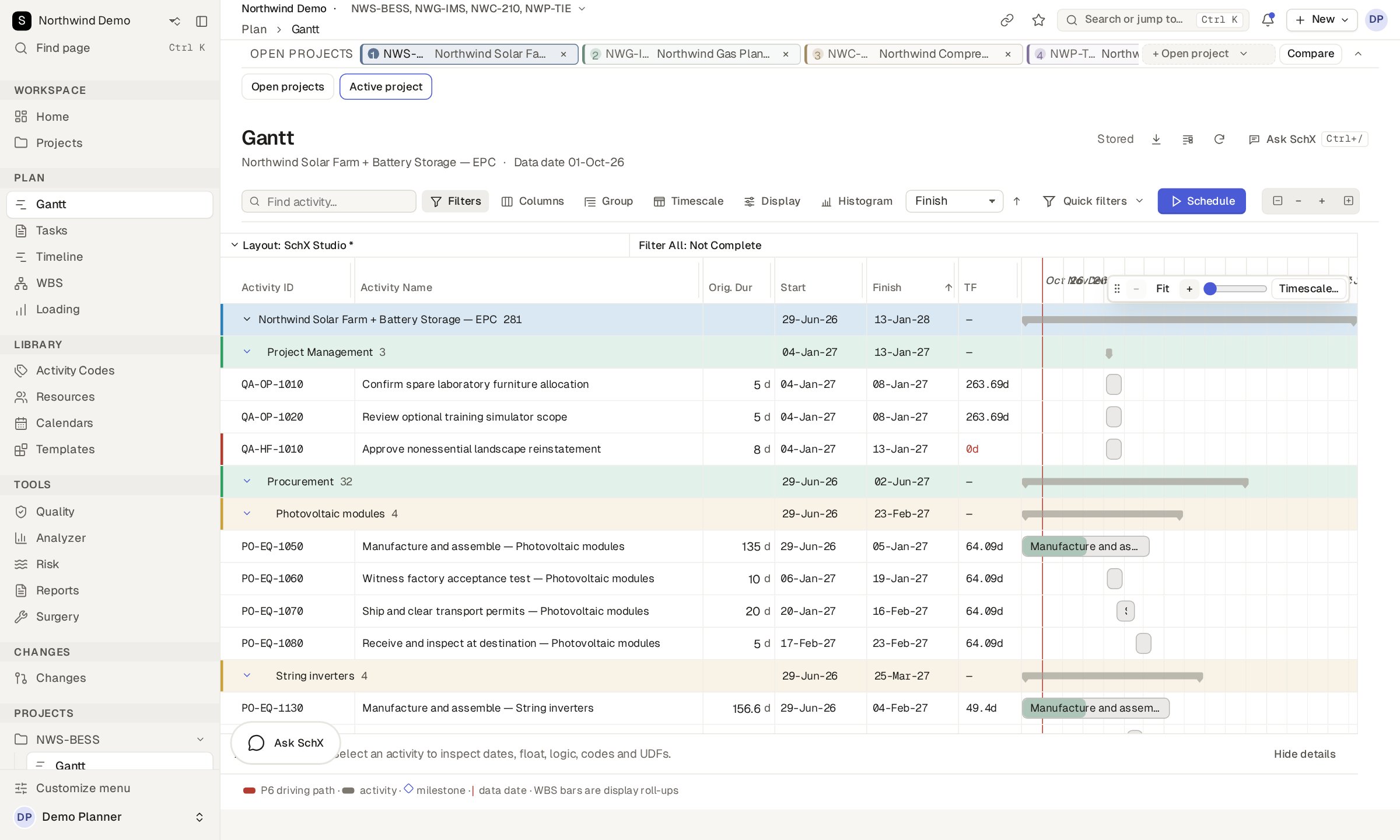
What's new
A new interface, resource loading and a model built for scheduling.
SchX keeps growing, and every feature still runs on the same engine and the same approval rules.
SchX Studio
A rebuilt interface in React with the SchX design system: floating windows, one type scale, and Light, Dark, SchX and SchX Dark themes.
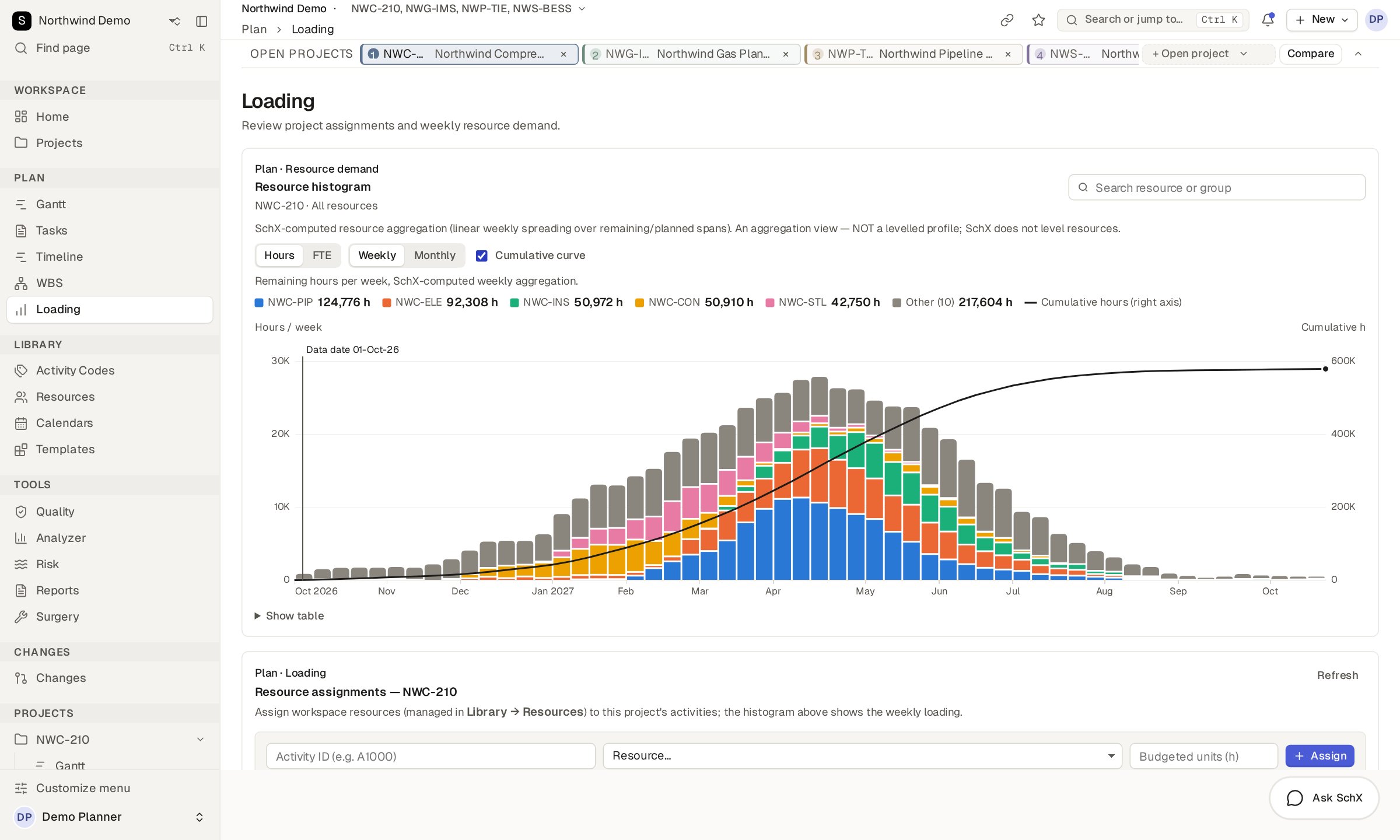
Resource histograms
Craft loading in hours or FTE, weekly or monthly, with limit lines and an S-curve on the same chart.
Agentic leveling
The assistant proposes a levelled plan within your craft limits, explains every move, and stages it for a planner to approve.
SchX Private AI
AI that runs on your own hardware, not a cloud service. It reads through SchX's tools and proposes; people approve.
MCP connectors
Connect ChatGPT, Claude or Grok to your schedule. Each connector is yours, tied to one workspace and optionally pinned to one project.
Standalone Lite
SchX for Windows that runs from PowerShell, with no admin rights, and runs locally on your machine.
How we think about it
The engine does the math. The assistant does the talking. You make the call.
We built SchX so planners get faster answers without handing over responsibility for the plan.
Automation computes
Dates, float, paths and checks. Anything with one right answer.
Intelligence proposes
Explanations, fixes and new sections of plan, ready for review.
People decide
Nothing changes in the schedule until someone approves it.
Every number has a source
If we can't say where a value came from, we don't show it.
Built in, not bolted on
Your schedule is calculated by a real engine. Nothing is improvised.
SchX has its own scheduling engine, Arc, built right into the platform. It reads your logic and calendars, runs the forward and backward passes and gives the same answer every time. There's nothing extra to set up and nothing to wait for.
No sandbox
Nothing to spin up before a schedule can be calculated.
No code interpreter
No model writing scripts to do date arithmetic.
No extra VM
Arc is built into SchX. Nothing else to deploy.
Same input, same answer
Repeatable to the minute, every run.
Explore SchX
One platform for the whole project controls team.
What is it, and can I trust the numbers?
The deterministic core, how the two halves fit together, and the Arc engine.
Read more IntelligenceWhat can I ask it, and what can it build?
Answers with the driving chain, plans drafted from templates, mobile and voice, and MCP connectors for outside AI tools.
Read more AnalysisIs my schedule healthy, and are changes safe?
Quality checks, risk models in minutes, reports and a governed way to change the plan.
Read more TeamsCan the whole team work in it?
Many planners in one project with no lost work, plus the security and admin controls IT will ask about.
Read more IntegrationDoes it work with what we already use?
Reads and writes P6, MS Project and Excel, and works with P6 or on its own.
Read more DemoTry it on a real-sized schedule.
Five fictional schedules, the full analysis suite and the assistant. Nothing to install.
Open the demoDeployment and scaling
A hybrid application. You choose how to run it.
The same engine, analysis and change controls, whether one planner uses SchX or a whole planning team.
Team server
Multi-user, in your private cloud or data center, through the web application.
Standalone
One planner on a Windows machine, working fully offline.
Standalone Lite
Windows, PowerShell, no admin rights. Runs locally.
iPhone
Ask your live schedule from your iPhone through a connected AI assistant.
Replaceable AI
Optional, chosen in Admin, and denied network access until an administrator allows it.
MCP connectors
ChatGPT, Claude and Grok read and propose. Only a planner applies.
Deterministic meets intelligence
Two halves, one boundary.
Some questions have one right answer, and a machine should compute it. Others need judgment, and that's where the assistant helps. SchX keeps the two apart. The assistant can read, explain and suggest, but it can't write, approve, apply or export anything.
Computes
Arc, analysis and change control.
Proposes
Explains, traces and drafts, then waits for you.
Test drive SchX
Four fictional EPC schedules, the Arc engine, the analysis suite and the SchX assistant. Sign in with demo / demo. It resets every hour.